
Collaborative LLM Architecture with Knowledge Base
Why not create full multistep workflows that are enabled by multiple and multi instance LLMs that mimic Agile
LangChain, Pipelines, and the Case for Agentic Automation
A practical guide for developers building with LLMs
The Problem with One-Shot AI
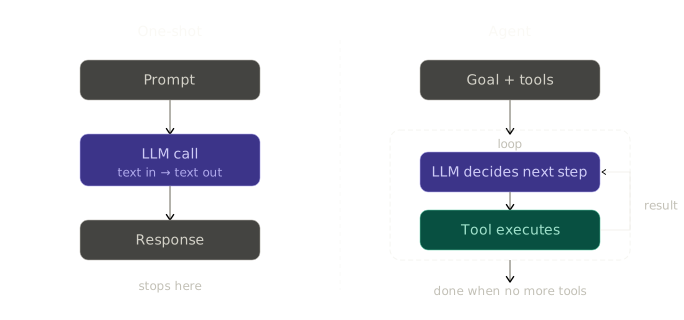
Most developers encounter LLMs the same way: send a prompt, get a response, done. It works for answering questions. It falls apart the moment the task requires more than one step.
Consider something deceptively simple: "Add a new feature to this codebase." A one-shot call can't do it. It can't read multiple files, write code, run a build, catch the error, fix it, and commit. Not because the model lacks capability — but because there's no mechanism for it to act in a loop, use tools, or maintain state across steps.
This is the gap that LangChain and agentic pipelines fill.
What LangChain Actually Is
LangChain is a framework for building applications powered by language models. The name suggests chains — and that's the right mental model to start with.
A chain is a sequence of operations where the output of one step feeds into the next. In practice:
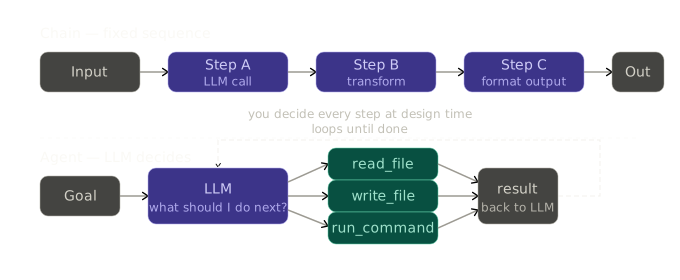
This sounds simple because it is. The power isn't in any single link — it's in composability. You can chain an LLM call to a database lookup, feed that into another LLM call for reasoning, then pipe the result into a code executor. Complex workflows emerge from simple, testable pieces.
LangChain handles the plumbing: prompt formatting, model abstraction, output parsing, memory, tool calling, and the connective tissue between steps. You describe what you want the pipeline to do, not how to wire every API call.
Chains vs Agents: A Critical Distinction
Chains are deterministic. The sequence of steps is fixed at design time. You decide the flow; the LLM fills in content at each node. Predictable, fast, easy to debug.
Agents are dynamic. The LLM itself decides what to do next based on the current state. Given a goal and a set of tools, an agent reasons, acts, observes the result, and repeats until the task is done — or it decides it can't continue.
The difference matters enormously in practice:
Chain Agent Flow Fixed LLM decides Tools Optional Central Predictability High Lower Best for ETL, formatting, classification Tasks requiring judgment Debugging Straightforward Requires observability
Most real systems use both: chains for the predictable parts, agents for the parts that require reasoning.
Tools: How Agents Interact with the World
An LLM by itself is a text-in, text-out function. Tools are what let it act.
A tool is a function with a name, a description, and a schema. The model reads the description to decide when to call it, uses the schema to form the arguments, and receives the return value in the next context window. From the model's perspective, tools are a vocabulary of actions it can take.
Common tools in practice:
File tools — read a file, write a file, list a directory
Shell tools — run a command, check build output
Search tools — query a database, search the web
API tools — call an external service, post to Slack, create a Jira ticket
The key insight: the model doesn't run the tool. Your code does. The model emits a structured request (call read_file with path="src/App.jsx"), your runtime executes it, and the result goes back into the model's context. The loop continues until the model stops requesting tools.
This separation of reasoning and execution is what makes agentic systems safe to build — you control exactly what actions are available.
The Agent Loop
The core of any agent is a loop. It's simpler than it sounds:
1. Model receives: system prompt + conversation history + available tools2. Model responds: text and/or tool calls3. If tool calls: execute them, append results to history, go to 14. If no tool calls: agent is doneThat's it. Every agent framework — LangChain, LangGraph, AutoGen, CrewAI — is a variation on this loop with different opinions about state management, multi-agent coordination, and observability.
The history is the invisible engine. The model has no memory between API calls; what looks like "thinking" across multiple steps is really the model receiving its own previous output plus the tool results as context on every iteration. You're not building a persistent mind — you're reconstructing one, carefully, on each call.
LangGraph: When You Need a State Machine
LangChain handles linear chains well. The moment you need branching — "if the reviewer rejects the code, loop back to the developer; if the build fails, send it back for fixes" — you need something more structured.
LangGraph extends LangChain with a proper graph abstraction. Your workflow becomes a state machine:
Nodes are functions (or agents) that do work and return state updates
Edges are fixed connections between nodes
Conditional edges route based on the current state — this is where branching lives
State is a typed dictionary that flows through every node, accumulating as the workflow progresses
The practical payoff: complex multi-agent workflows become readable. You can look at a LangGraph definition and immediately understand who does what, in what order, and under what conditions. The graph is the architecture diagram.
Multi-Agent Systems: Separation of Concerns
A single agent trying to plan, implement, review, and test is like a developer who writes code, reviews their own PR, and marks it as approved. The incentives are wrong and the errors compound.
Multi-agent systems apply the principle of separation of concerns to AI pipelines. Each agent has a role, a scope, and access only to the tools it needs:
Manager — plans, delegates, reviews outcomes. Reads files but writes nothing. Breaks work into steps.
Developer — implements. Has read and write access to the codebase. Strictly follows the plan. Flags anything outside scope instead of improvising.
Reviewer — reads code, checks against requirements and conventions. No write access. Cannot approve its own work.
Tester — runs the build, checks output, reports pass/fail. Does not fix. Does not interpret.
Each agent's scope is enforced by which tools it receives. The reviewer literally cannot write files — not because it's been told not to, but because the tool doesn't exist in its context. Constraints in the toolset are more reliable than constraints in the prompt.
Why This Approach Works for Automation
The case for agentic pipelines over traditional automation comes down to three things:
Ambiguity handling. Traditional automation scripts fail loudly when they encounter anything unexpected. An agent can reason about novel situations — read an unfamiliar file structure, adapt to a codebase it hasn't seen before, decide what to do when a step doesn't go as planned. This is the fundamental difference between rule-following and reasoning.
Self-correction. When a developer agent produces code that fails to build, the tester reports back, the reviewer identifies the issue, and the developer corrects it — automatically, in the same run. The pipeline doesn't need a human to notice the failure and restart the process.
Auditability. Every agent decision, every tool call, every state transition is logged. You can replay a run, inspect why a particular decision was made, and identify exactly where something went wrong. This is better observability than most traditional automation pipelines offer.
The tradeoff is cost and latency. Each agent turn is an API call. A pipeline with four agents and five iterations might make twenty or more LLM calls on a single task. For batch processing and asynchronous workflows this is entirely acceptable. For synchronous, user-facing interactions, you need to be thoughtful about where the agent boundary sits.
Integrating with Real Systems
Agents become genuinely useful when they're connected to the systems developers already use. A few patterns worth knowing:
Jira as a task queue. Instead of manually specifying what the agent should do, pull the next "To Do" ticket from the board. The ticket summary is the task. The agent transitions the ticket through statuses as it works, creates sub-tasks for each step in its plan, and opens new tickets for anything it discovers is out of scope. The Jira board becomes a real-time view of what the agent is doing.
Git as the output layer. The agent works on a feature branch, commits its changes with a meaningful message, and pushes. A human reviews the PR. The agent never touches main directly. This keeps humans in the loop for the part that matters — code review — while automating everything before it.
CLAUDE.md as institutional memory. A markdown file in the project root that the agent reads before every task. It contains project conventions, build commands, what files are off-limits, domain-specific rules. This is how you make a general-purpose agent behave like a developer who actually knows your codebase.
Where to Go from Here
A sample project to start can be found here:
https://github.com/krafteq/krafteq.dev/tree/main/agent-loop-with-kb-sample-project
A sample LangGraph setup can be found here:
https://github.com/krafteq/krafteq.dev/tree/main/agent-loop-with-kb
LangChain's documentation is the right starting point for understanding the primitives. LangGraph's documentation is where to go once you're ready to build something with real branching logic.
The more important investment is in the non-code layer: the system prompts, the CLAUDE.md conventions, the Jira workflow that feeds tasks in and surfaces results. The framework handles the plumbing. The thinking about what each agent should and shouldn't do — that's what determines whether the system is actually useful.
The goal isn't to replace developers. It's to handle the mechanical parts of the job — the parts where the answer is knowable, the conventions are documented, and the feedback loop is clear — so that developer attention can go where it actually matters.
Built with LangGraph, Claude Code, and a healthy respect for scope constraints.
Join the conversation
Comments and reactions are powered by GitHub (USA) via Giscus. Loading them connects your browser to GitHub servers.