
AI-Powered Camera Security & Diary Log
AI-Powered Camera Security & Diary Log
Part 1 — Local Inference with Ollama
This is Part 1 of a two-part series. It covers the full pipeline running fully locally with Ollama. A follow-up (Part 2) will show how to swap in a cloud vision model (Gemini, OpenAI, or Anthropic) with a single config change.
Requirements
Windows, Linux, or macOS
Python 3.11+
Ollama installed and running (for local inference)
Docker + Docker Compose
IP camera (RTSP), USB webcam, or any public stream (YouTube, HLS)
Problem Statement
Modern security and surveillance systems generate continuous streams of video data, yet extracting meaningful, human-readable insights from that data in real time remains a challenge. Traditional systems rely on basic motion detection or manual review, missing the nuance of what is actually happening in a scene — who is present, what objects are visible, and what actions are taking place. For both home security and workplace monitoring, the inability to distinguish between a delivery person, an unknown intruder, or a family member means constant false alerts or missed incidents. Without an intelligent layer on top of raw video, building context-aware security applications such as activity diaries, intrusion logs, or behavioural audit trails requires significant custom engineering effort.
Summary
This article walks through building a local AI-powered camera security and diary log system using Python, OpenCV, and a locally-hosted vision language model. Designed for both home security and activity monitoring use cases, the system connects to any camera source — IP cameras over RTSP, USB webcams, HLS streams, or live YouTube feeds — and, at a configurable sampling interval, uses a vision LLM running on your own machine to analyse a frame across three dimensions: objects present, people visible, and actions taking place. Observations that match user-defined security events are logged with timestamps, forming a queryable, already-filtered audit trail. Everything runs on-device via Ollama, so no video ever leaves your network. The proof-of-concept in this article uses llava, a local vision-language model that returns natural-language descriptions (a GPU is recommended, though it runs on CPU).
The full source code is available on GitHub: https://github.com/krafteq/krafteq.dev/tree/main/cv-analysis-with-llm
Scope of the Article
This article focuses on:
Supporting multiple camera source types: IP, USB, HLS, and YouTube streams.
Running a local vision model via Ollama, behind a provider abstraction that is also ready for cloud models (covered in Part 2).
Defining and tagging custom security events in YAML.
Logging timestamped observations to a local audit trail.
Deploying with Docker while keeping Ollama on the host for GPU access.
Introduction to the Stack
Security camera systems traditionally operate as passive recorders — capturing footage that is only reviewed after an incident occurs. This system takes a different approach: frames are sampled at a configurable interval (ANALYSIS_INTERVAL, default 30 seconds) and each sampled frame is analysed by a vision LLM, turning raw video into a structured, searchable security log in near real time. Note that the camera is read continuously at the configured FPS, but only one frame per interval is sent to the model — analysing every captured frame would be far too slow on local hardware.
OpenCV handles all camera interfacing regardless of source type. A single abstraction resolves the correct source — whether an RTSP URL, a USB device index, an HLS endpoint, or a resolved YouTube stream URL.
Ollama enables fully local inference with no data leaving your network. This is the entire focus of Part 1 — the proof-of-concept runs on llava, a conversational vision model that answers in plain language (a GPU is recommended; it runs on CPU but slowly). Swapping to a cloud model for faster, GPU-free analysis is covered in Part 2.
Docker isolates the application while Ollama remains on the host machine for full hardware and GPU access.
The end-to-end analysis pipeline, from raw frame to tagged log entry.

Camera Source Types
One of the key design decisions is supporting multiple camera types through a unified config file. All cameras are defined in vision_config.yaml — the source type is resolved automatically at runtime.
cameras: # IP camera over RTSP - name: "Front Door" type: ip ip: 192.168.0.60 user: admin password: admin port: 554 stream: "0" active: false # USB webcam - name: "USB Webcam" type: usb device_index: 0 active: false # Public YouTube live stream - name: "Shinjuku Station Tokyo" type: stream url: "https://www.youtube.com/watch?v=lA6TaaMGgDo" active: trueThe entry point currently runs the first camera with active: true (single-camera mode). A CAMERA_MODE setting and an all_active_cameras helper are scaffolded in the config for future parallel multi-camera support, but they are not yet wired into the run loop — setting CAMERA_MODE=multi today has no effect.
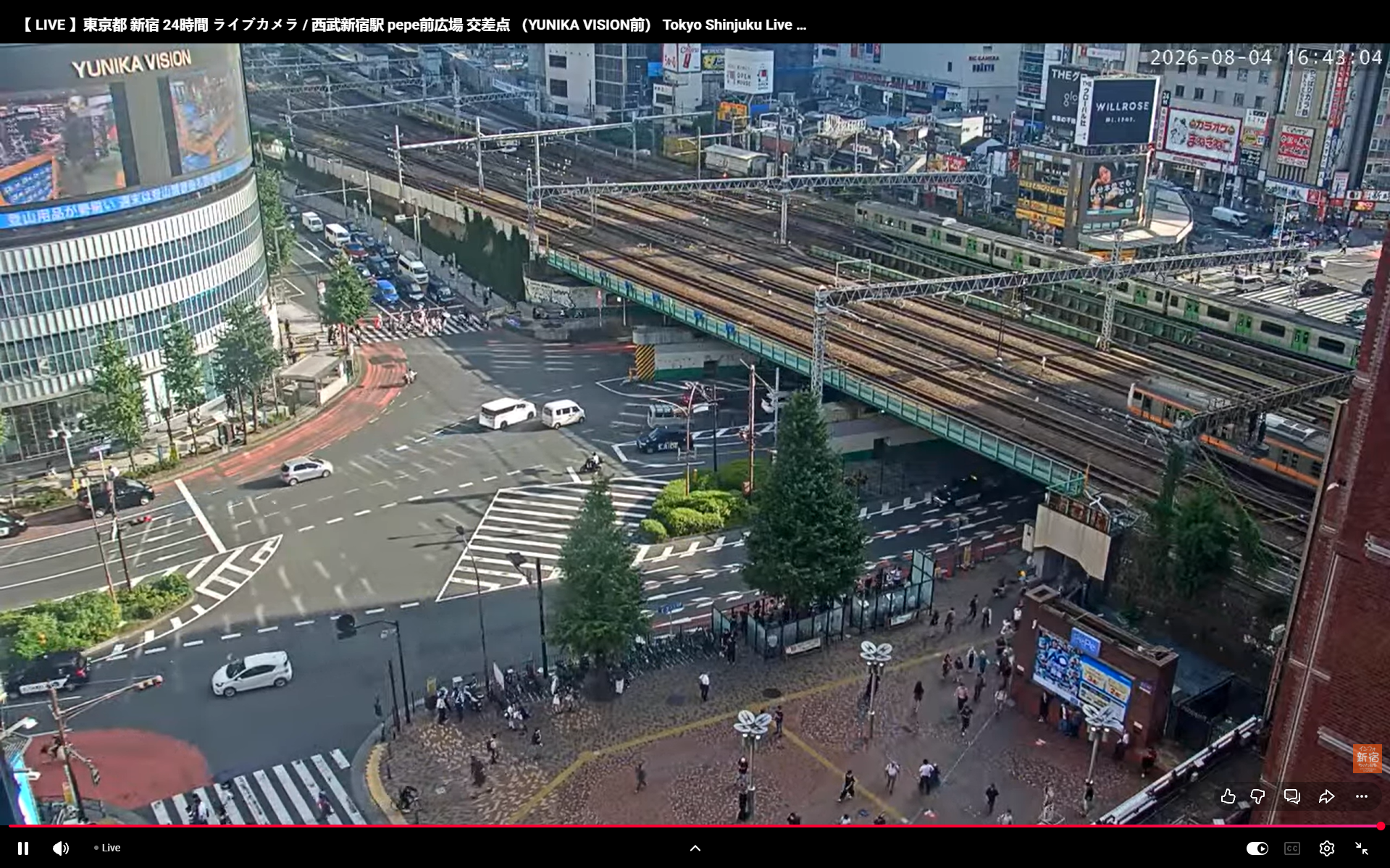
For the proof-of-concept we point at a public Tokyo live stream, which gives a busy, continuously-changing scene to test against:
The public Shinjuku Station live stream used as the proof-of-concept source.
A local run prints each analysis to the console as it happens:
2026-07-27 16:17:43,002 [INFO] Resolved YouTube URL to direct stream
2026-07-27 16:17:43,003 [INFO] Notifications disabled (NOTIFICATIONS_ENABLED=false)
2026-07-27 16:17:43,012 [INFO] Event logger ready — tracking 12 event types
2026-07-27 16:17:43,627 [INFO] LLM provider: Ollama (llava) @ http://localhost:11434
2026-07-27 16:17:43,628 [INFO] [Shinjuku Station Tokyo] Initializing | context: live public camera at a busy Tokyo train station
2026-07-27 16:17:45,370 [INFO] [Shinjuku Station Tokyo] Stream opened! Press 'q' to quit
2026-07-27 16:18:20,928 [INFO] HTTP Request: POST http://localhost:11434/api/chat "HTTP/1.1 200 OK"
2026-07-27 16:18:20,929 [INFO] [Shinjuku Station Tokyo] -> Busy street scene at night, with people walking on sidewalks, cars and buses moving
2026-07-27 16:18:45,345 [INFO] [Shinjuku Station Tokyo] -> People walking, cars driving, traffic lights, buildings, signs, screens
2026-07-27 16:18:45,346 [INFO] [Shinjuku Station Tokyo] [16:18:45] Objects: Busy street scene at night, people walking on sidewalks, cars and buses moving. | People: None | Actions: People walking, cars driving, traffic lights, buildings, signs, screens.
2026-07-27 16:18:45,346 [INFO] [Shinjuku Station Tokyo] People walking cars driving traffic | PERSON_DETECTED, PHONE_USE
Console output from a local run against the Tokyo stream.
For YouTube and other web streams, yt-dlp resolves the embed URL to a direct playable stream before passing it to OpenCV:
def _resolve_stream_url(url: str) -> str: if "youtube.com" in url or "youtu.be" in url: import yt_dlp ydl_opts = {"quiet": True, "format": "best[ext=mp4]/best"} with yt_dlp.YoutubeDL(ydl_opts) as ydl: info = ydl.extract_info(url, download=False) return info["url"] return urlLocal LLM Inference with Ollama
The vision model is selected entirely through .env — no code changes needed, as long as Ollama is running and the model has been pulled (ollama pull llava). The provider abstraction in llm_provider.py encodes each frame to JPEG and sends it to the model with the analysis prompt.
# Local inference (no internet required)LLM_PROVIDER=ollamaLLM_MODEL=llava# Ollama hostOLLAMA_HOST=http://localhost:11434# Path to the cameras + events configCAMERAS_CONFIG=vision_config.yamlCAMERAS_CONFIG points to your cameras-and-events file. The app looks it up relative to where it runs, so set it here (or run from the folder that contains vision_config.yaml) — otherwise it starts with no cameras and exits.
For local inference this article uses Ollama, with llava (used here) or moondream as the model.
The same provider abstraction also supports cloud vision models (Gemini, OpenAI, Anthropic) through the identical one-line
.envswap. That is the subject of the follow-up article (Part 2).
Choosing a local model
This proof-of-concept uses llava because it answers in conversational, natural language ("two people crossing, one in a red jacket") — which is exactly what the keyword-based event matching needs. Smaller, detection-oriented models such as moondream are faster, but for some prompts they return spatial data — bounding-box coordinates rather than prose — which the event matcher cannot use. If you swap models, favour one that answers in words.
Whichever model you choose, the pipeline makes three calls per sampled frame (objects, people, actions), so capping the generation length keeps each response short:
res = self.client.chat( model=self.model, messages=[{ "role": "user", "content": prompt, "images": [_encode_frame(frame)] }], options={ "num_predict": 80, # cap output length — key fix for rambling light models "temperature": 0.2, # steadier, more concise descriptions },)If a model still struggles with a long input, trimming the prompt (the per-event context hints stack up) or collapsing the three calls into one further reduces the token load.
Security Event Definitions
Security logic lives entirely in vision_config.yaml. Each event defines a tag, which LLM output fields to search, and the trigger keywords. When an observation's text matches an event's keywords, the event's tag is attached to that log entry.
events: - tag: PERSON_DETECTED match_in: [people] keywords: [person, human, man, woman, child] - tag: UNKNOWN_PERSON match_in: [people] keywords: [unknown, stranger, unrecognized] - tag: DOOR_ACTIVITY match_in: [actions] keywords: [opening, closing, entering, leaving, door] - tag: MULTIPLE_PEOPLE match_in: [people] keywords: [crowd, group, several, multiple]Events do double duty: only observations that match at least one event are logged, and each logged entry is tagged with the events it matched — so the log is both pre-filtered and filterable by tag (e.g. "show me every UNKNOWN_PERSON entry"). No code changes are needed to add, remove, or retune an event.
Event Log Format
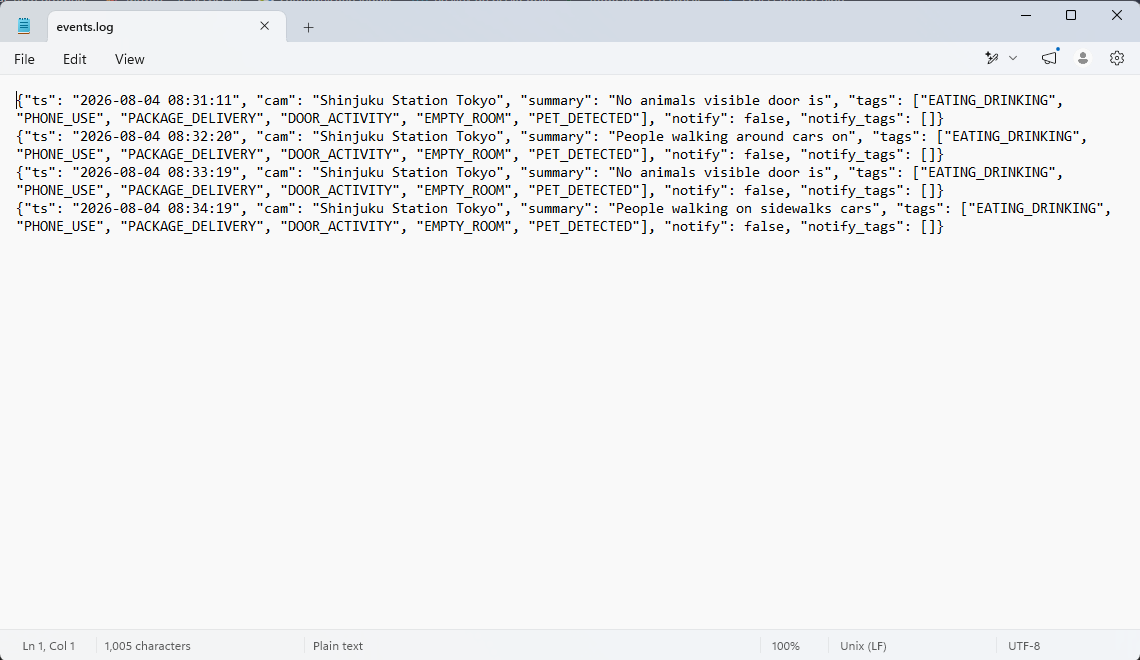
Every observation that matches at least one event is written to logs/events.log as a JSON line; observations that match nothing are skipped. The log therefore contains only meaningful events — it is already the filtered record, not a raw feed. Each entry includes a short (up to five-word) activity summary alongside its matched tags:
{"ts": "2026-03-18 10:23:31", "cam": "Shinjuku Station Tokyo", "summary": "crowd walking crossing street busy", "tags": ["MULTIPLE_PEOPLE", "PERSON_DETECTED"]}{"ts": "2026-03-18 10:24:10", "cam": "Front Door", "summary": "person entering opening front door", "tags": ["PERSON_DETECTED", "DOOR_ACTIVITY"]}{"ts": "2026-03-18 10:25:00", "cam": "Front Door", "summary": "LLM timeout no response", "tags": ["LLM_TIMEOUT"]}Docker Deployment
Ollama runs on the host machine for full hardware access. Only the Python application runs in Docker.
docker-compose.yml (key parts):
services: detector: build: . container_name: diary-log-detector env_file: .env environment: - OLLAMA_HOST=http://host.docker.internal:11434 - HEADLESS=true volumes: - ./logs:/app/logs - ./vision_config.yaml:/app/vision_config.yaml restart: unless-stoppedvision_config.yaml is mounted as a volume — cameras and events can be reconfigured without rebuilding the image. Logs are persisted to the host logs/ folder.
Note for Linux hosts:
host.docker.internalresolves automatically on Docker Desktop (macOS/Windows). On plain Linux you may need to addextra_hosts: ["host.docker.internal:host-gateway"]to the service so the container can reach Ollama on the host.
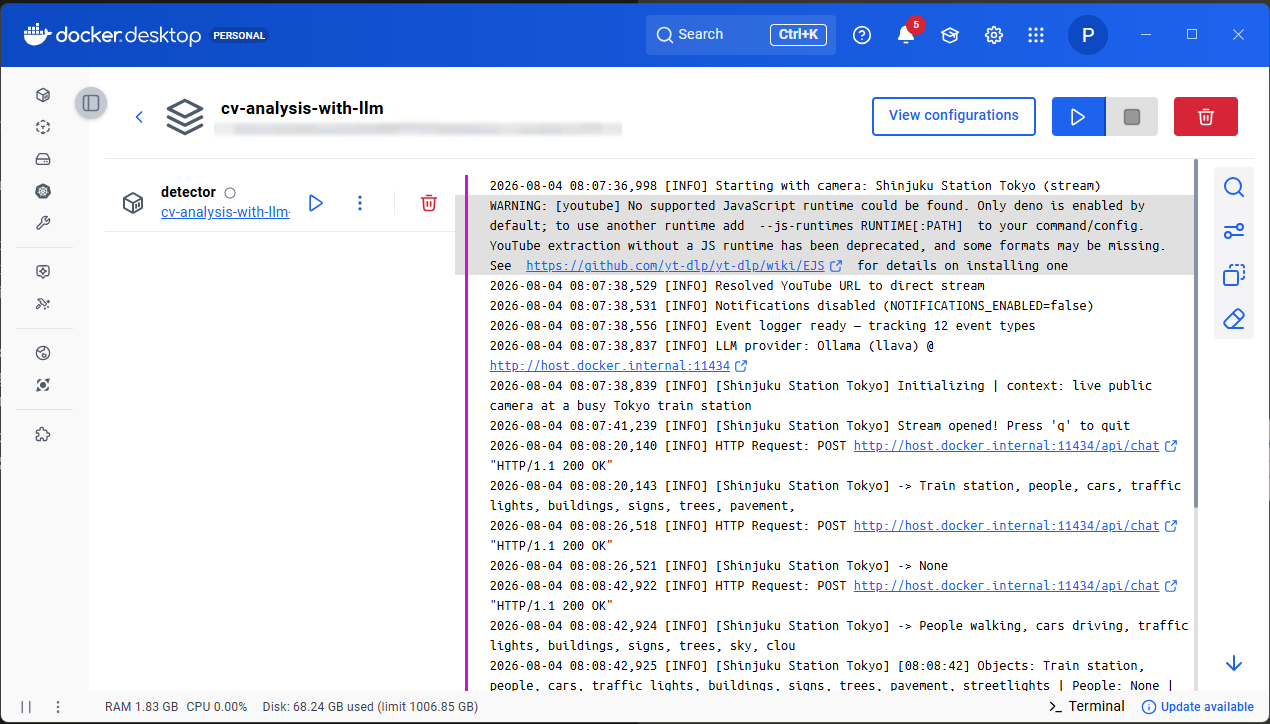
# Startdocker compose up --build -d# Watch logs livedocker logs -f diary-log-detector# Watch events onlytail -f logs/events.log# Stopdocker compose downOnce running against the live stream, the container logs each sampled observation — this is the clearest proof the pipeline is working end to end:
Container logs showing each sampled observation as it is analysed.
The events.log audit trail of matched events.
Comparison to Cloud-Based Security Solutions
Compared to cloud vision APIs, this local system trades differently on a few axes:
Privacy — fully local; footage never leaves your network, versus frames sent to external servers.
Cost — free with a local model, versus per-API-call pricing.
Camera sources — IP, USB, HLS, and YouTube, versus typically static images or a proprietary SDK.
Customization — full control over events and prompts, versus whatever the provider's API exposes.
Internet — needed only for public web streams like YouTube, versus always required.
Audit log — local JSON lines you fully own, versus logs stored on provider infrastructure.
Advantages and Disadvantages
Advantages
Supports any camera source — RTSP, USB, HLS, or live YouTube streams.
Runs a local vision model (llava, moondream) via Ollama — no frames leave your network.
Provider abstraction is ready for cloud models with a single env change (see Part 2).
Customisable security events defined in YAML without touching code.
Timestamped audit log of matched events, with short activity summaries and tags — pre-filtered and filterable by tag out of the box.
LLM timeout detection — stalls are logged and flagged.
Docker-ready with host Ollama for GPU access.
Disadvantages / Considerations
Analysis is sampled at an interval (default 30s), not per frame — brief events between samples can be missed.
YouTube stream URLs can expire and need periodic refresh via
yt-dlp.Local models (llava, moondream) are slow on CPU — GPU strongly recommended for anything beyond a proof-of-concept.
Single camera mode currently — multi-camera parallelism is scaffolded but not yet wired into the run loop.
USB cameras are not accessible inside Docker on Windows.
Conclusion
An AI-powered camera security and diary log system built on OpenCV, a local Ollama vision model, and Docker provides a privacy-first, cost-free foundation for intelligent video monitoring. The system is source-agnostic — the same pipeline that monitors a private IP camera at your front door can equally analyse a live public stream from a busy Tokyo train station. Observations that match a user-defined event are tagged and logged, forming a clean, queryable, already-filtered audit trail, all without a single frame leaving your machine. The architecture is intentionally simple to start but ready to grow into a multi-camera security dashboard with a web frontend, database persistence, and real-time incident feeds.
A follow-up article (Part 2) swaps the local model for a cloud vision provider — trading some privacy for speed and stronger models, with no code changes.
Full source code: github.com/krafteq/krafteq.dev/tree/main/cv-analysis-with-llm
References and Further Reading
Ollama — local LLM runtime. https://ollama.com
moondream — small vision language model. https://github.com/vikhyat/moondream
LLaVA: Visual Instruction Tuning, Liu et al., 2023. arXiv:2304.08485
yt-dlp — YouTube stream resolver. https://github.com/yt-dlp/yt-dlp
OpenCV Documentation. https://docs.opencv.org
Docker Documentation. https://docs.docker.com
Join the conversation
Comments and reactions are powered by GitHub (USA) via Giscus. Loading them connects your browser to GitHub servers.